
Where Cursor Stands In 2026, And Why Claude Code Is Worth Trying
Where Cursor Stands In 2026, And Why Claude Code Is Worth Trying
I recently wrote another article, Cursor And Claude Code Should Not Be Compared Like This. The point was simple: it is too shallow to compare an IDE and a CLI as if one must replace the other.
Then I saw another viral article arguing that Cursor is facing an existential moment. It mixed market sentiment, funding narratives, enterprise buying behavior, the rise of Claude Code, and Cursor’s own product shifts into a compelling story: the once hottest AI IDE may be losing its era.
That made me want to ask a more practical question: where does Cursor really stand in 2026? If you already use Cursor, should you start using Claude Code, combine both, or stay with Cursor only?
My short answer:
- Cursor is not dead, but it can no longer win only by telling the story of “the best AI IDE.”
- Claude Code is worth trying seriously, not because it must replace Cursor, but because it represents another increasingly important entry point.
- For most real developers, the best answer is probably not either-or. Treat
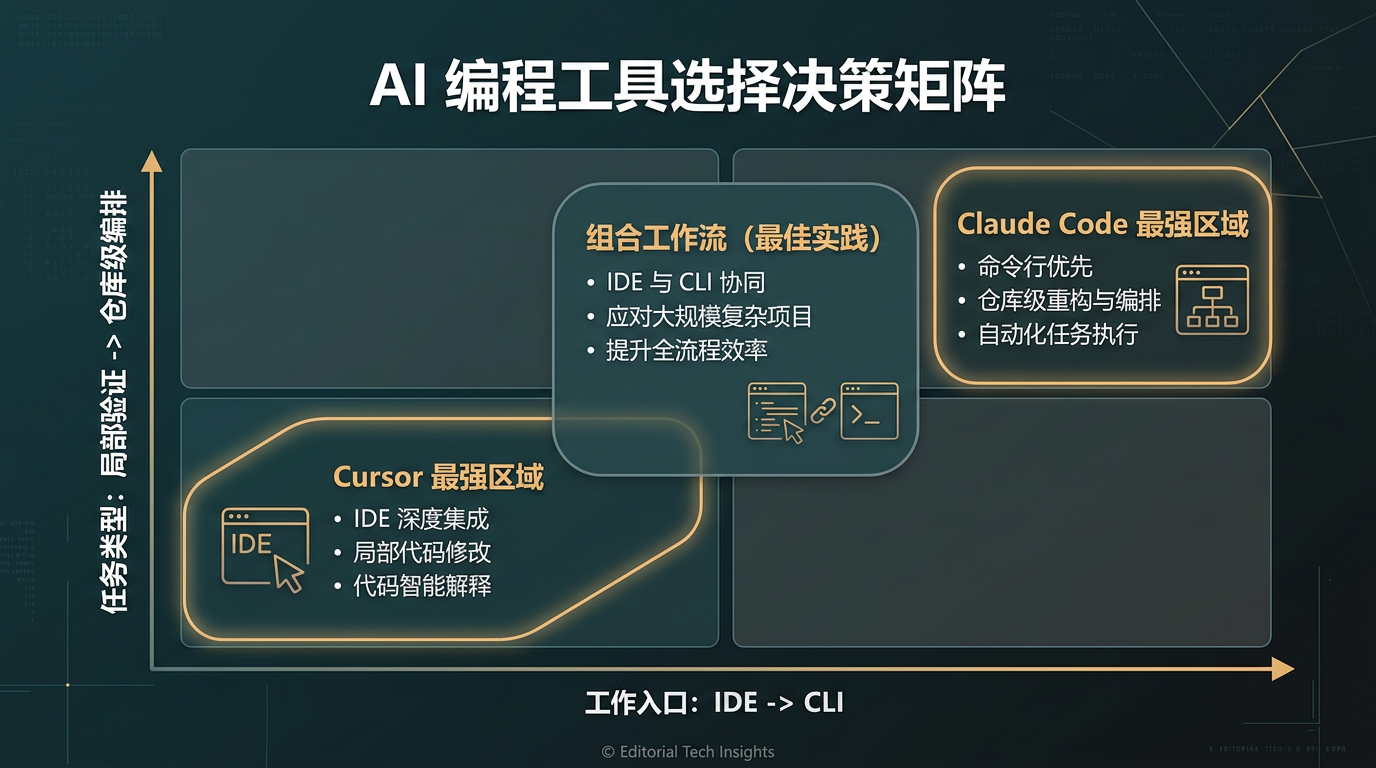
Cursoras the IDE workbench andClaude Codeas a CLI agent entry. - If your work depends heavily on page validation, editor diagnostics, local debugging, and current-file context, Cursor remains reasonable as a primary tool.
- If your work is moving toward repository-level changes, scripted workflows, remote environments, batch tasks, and automation, ignoring Claude Code becomes costly.
What The “Cursor Is In Trouble” Narrative Gets Right
The center of AI programming is moving from “complete this code” to “run this workflow.”
Code completion, local rewriting, and explanation still matter. But the more important capability is now whether an agent can accept a larger goal, break it down, call terminal commands, run tests, use browser automation, connect MCP tools, and verify progress around a repository rather than a single editor window.
This is where Claude Code deserves attention. Its CLI design includes session resume, extra directories, worktrees, MCP, print mode, structured output, remote control, and browser integration. These are not just chat features in a terminal. They are signs of an agent being placed directly into engineering workflows.
Model vendors are also moving upward into the tool layer. Cursor used to benefit from wrapping strong models in a better editing experience. Now model vendors are building their own agent tools. The moat for tool products is no longer “put an LLM in an editor.” It is whether the product can connect requirements, code, validation, external tools, and team governance into a loop.
Enterprise markets also do not move exactly like developer social media. A tool can be criticized online while still growing in organizations because enterprise adoption depends on procurement, security, identity management, audit logs, privacy modes, budgets, and migration cost.
Cursor’s Position Is Moving, Not Disappearing
I do not think “Cursor will be replaced by Claude Code” is the right conclusion.
A more accurate statement is: Cursor’s value is moving from “default most advanced AI editor” toward “integrated developer workbench.”
Cursor’s core value is not only completion or chat. It is the integration of many nearby contexts:
- Which files are open
- Where the cursor is
- Which files changed recently
- What diagnostics and lint errors are visible
- What the local terminal just ran
- What the browser preview shows
- What the agent already tried
Each item alone is not dramatic. Together, they reduce the distance between understanding context and verifying work.
Cursor is also moving toward agents. Cloud Agents can run in isolated cloud environments, build, test, use browsers, connect MCP, and be triggered from GitHub, GitLab, Slack, Linear, or APIs. That means Cursor is not only an IDE with a chatbot. It is trying to cover the local developer surface, agent execution, and team governance.
The problem is that the story is no longer as simple as before. Cursor used to feel sharp because the product narrative was clean. Now it has to compete with model-vendor CLI agents, terminal-native workflows, and enterprise requirements around governance and cost.
That does not remove its value. It means the product is growing from a breakout tool into a more complex platform.
What Claude Code Changes
Claude Code makes the terminal one of the primary interfaces for AI development.
That matters because the terminal is naturally close to:
git- tests and builds
- logs
- scripts
- containers
- remote machines
- CI/CD
- issue trackers and command-line tools
Its CLI options reinforce long workflows and composition: resume sessions, worktrees, multiple directories, MCP configuration, structured output, and programmatic execution.
This makes it especially attractive for people whose real work center is not an editor window but shell, tmux, servers, containers, worktrees, and long-running tasks.
The deeper change is that the IDE is no longer the only obvious main interface. For some tasks, the terminal is the natural stage for agents.
Cursor’s Current Role
The best short description is:
Cursor is now best understood as an integrated developer workbench with an IDE as its main interface.
That has several implications.
First, Cursor is still one of the most complete IDE-shaped AI work surfaces. If you are doing frontend, full-stack, product UI, interactive flows, or local debugging, the ability to keep editor state, terminal feedback, page validation, and agent history close together is highly valuable.
Second, Cursor is increasingly a team and enterprise product. Its Teams and Enterprise material emphasizes identity, privacy mode, usage controls, audit logs, admin APIs, AI code tracking, Cloud Agents, MCP, and organization policies.
Third, Cursor’s risk is also clear. It sits between stronger base models below and heavier enterprise-platform needs above. If it cannot show unique value either as an agent workbench or as an organizational control plane, users will ask why they should not use model-vendor tools directly.
Fourth, Cursor still has a strong verification loop. Real development is not finished when code is generated. You still need to click pages, inspect diagnostics, rerun tests, check diffs, observe terminal output, locate regressions, and patch edge cases. Cursor keeps these actions close.

How To Choose
You can continue using Cursor heavily if:
- Most of your work happens inside the IDE.
- You do frontend, full-stack, or product-oriented development.
- Page and interaction validation matters.
- Current-file context, local edits, diagnostics, and fast acceptance loops are important.
- You do not have many remote, batch, worktree, or CI orchestration tasks.
You should try Claude Code seriously if:
- Much of your work already happens in terminal, tmux, containers, or remote machines.
- You often handle repository-level refactors, batch scripts, long diagnostics, or automation.
- You like repeatable, headless, composable workflows.
- You work across multiple directories, worktrees, or branches.
- You care more about the agent’s relationship with shell, Git, MCP, and CI than editor polish.
For many serious projects, I would use both:
- Cursor for reading, editing, UI validation, and local interaction loops.
- Claude Code for repository-level execution, scripts, automation, remote workflows, and repeatable agent tasks.
The point is not to switch religions. It is to put each tool where its interface is strongest.
Closing
Cursor’s position has changed, but changed does not mean obsolete. It is no longer enough to call it “the best AI IDE” and stop there. It is becoming an IDE-centered workbench and team platform.
Claude Code matters because it makes the terminal a first-class AI development surface. That is a real shift.
The practical choice is to stop asking which one is the successor. Ask where your work actually begins, where validation happens, and which interface keeps the loop shortest.
Follow ZiCode on WeChat
If this post was useful, you can follow later updates on WeChat as well.

X / Twitter
Follow @ax2_zicode
Faster technical notes, short thoughts, and new-post alerts are posted on X.
