Cursor SDK And Custom Agents: What It Is Really For
Cursor SDK And Custom Agents: What It Is Really For
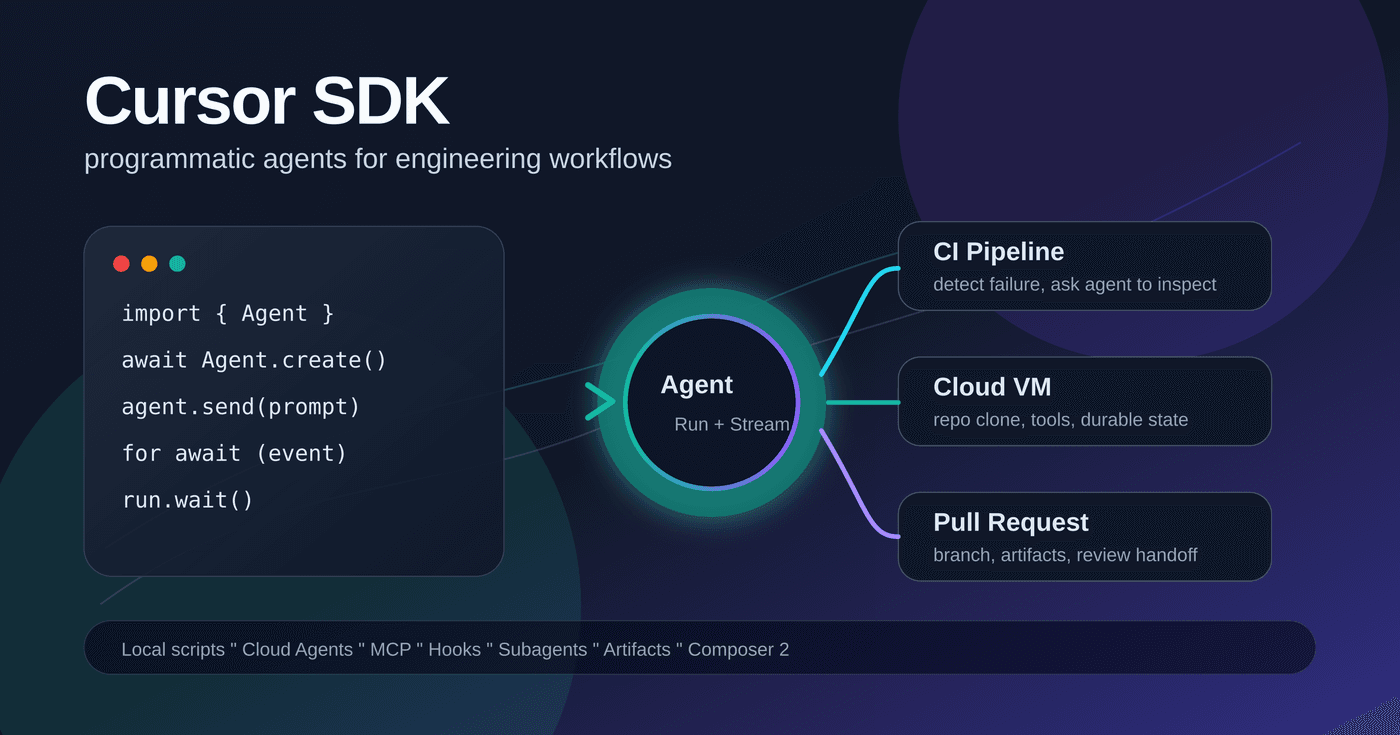
Cursor announced Cursor SDK: Custom Agents. The key message is that agents can be called directly from CI/CD pipelines, custom automation, internal products, and other programmable workflows.
This is not just “Cursor released an npm package.” It turns the agent capability behind Cursor IDE, CLI, and Cloud Agents into a component that code can call.
The Smallest Example
import { Agent } from "@cursor/sdk";

const agent = await Agent.create({
  apiKey: process.env.CURSOR_API_KEY!,
  model: { id: "composer-2" },
  local: { cwd: process.cwd() },
});

const run = await agent.send("Summarize what this repository does");

for await (const event of run.stream()) {
  console.log(event);
}
This looks like “call Cursor from Node.js.” The real abstraction is richer:
Agentis a persistent container with conversation state and workspace configuration.Runis one prompt submission with status, stream, result, cancellation, and git metadata.SDKMessageis a standardized event stream with assistant text, reasoning, tool calls, and status events.
You can treat Cursor Agent like a backend task system: create, send, stream, wait, cancel, resume, list history, and fetch artifacts.
Not Another Chat API
A normal chat API mainly handles model input and output. Cursor SDK exposes a coding agent runtime: repository context, files, terminal, semantic search, MCP, hooks, skills, subagents, artifacts, branches, and pull requests.
The point is not “you can send a prompt.” The point is “you can start an engineering agent with the same underlying harness as Cursor’s interactive products.”
That naturally pushes the SDK toward engineering automation rather than chatbot use.
Three Runtime Choices
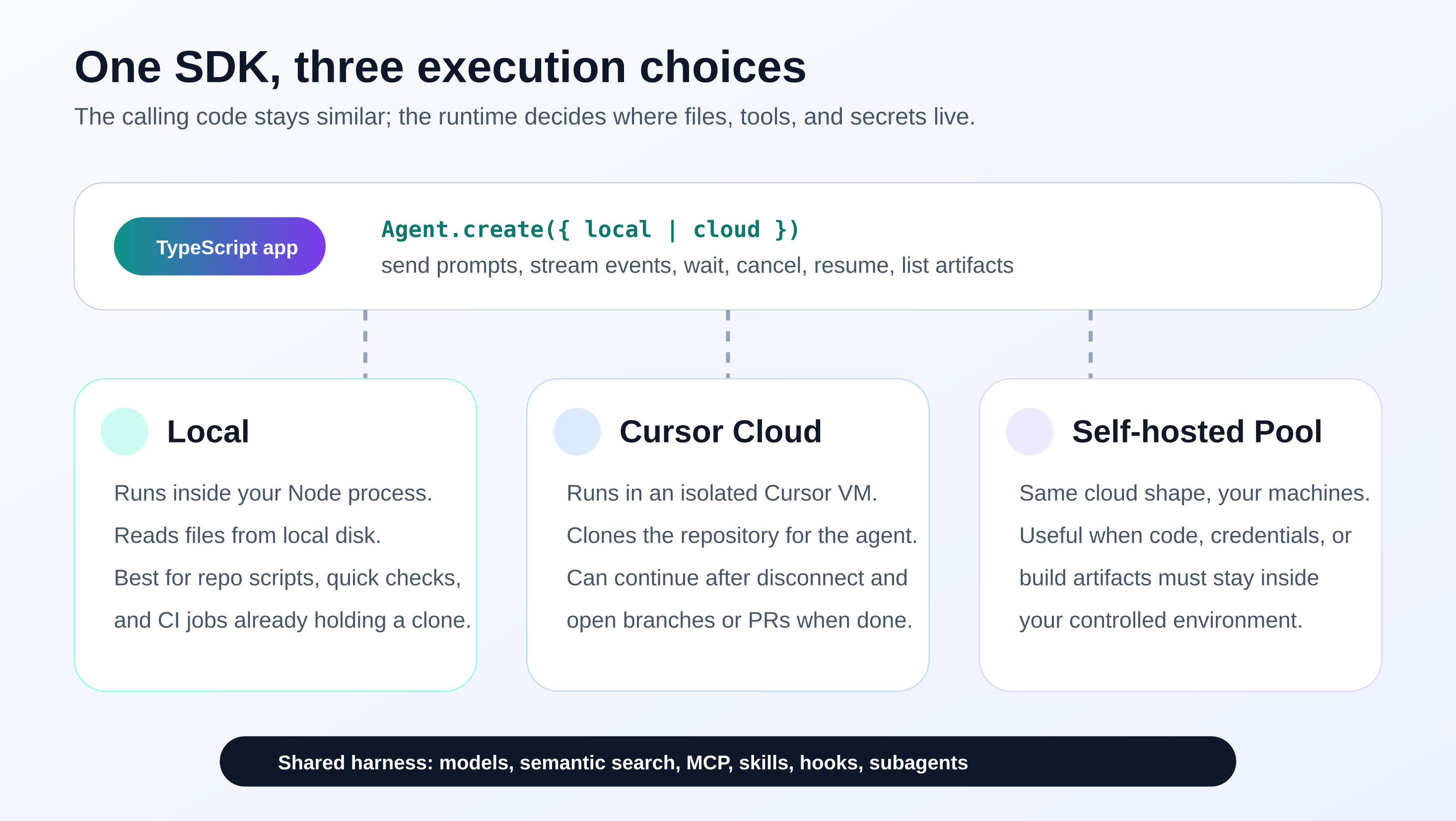
Agent.create() chooses the runtime.
Local runtime runs in the local Node process. It is good for development scripts and CI jobs where the repository is already checked out.
Cursor Cloud runs in Cursor-managed isolated VMs. It fits long-running tasks, parallel agents, repository cloning, PR creation, branches, screenshots, and artifacts.
Self-hosted pools matter for organizations where code, credentials, and build outputs cannot leave the internal network. In those environments, the barrier to AI coding adoption is often not model quality, but whether the code and execution environment can leave the company.
Building Blocks
The SDK is only one part of the stack.
First, @cursor/sdk is installed with:
npm install @cursor/sdkAuthentication uses CURSOR_API_KEY, usually from Cursor Dashboard integrations or a service account key.
Second, Cloud Agents API v1 separates persistent agents from prompt-level runs. Runs have status, streaming output, cancellation, and follow-up support.
Third, hooks live in .cursor/hooks.json. They can run before shell execution, after file edits, before MCP calls, before prompt submission, or when the agent stops. Hooks are the policy boundary.
Fourth, MCP, skills, and subagents can be configured. Subagents can be defined inline or read from .cursor/agents/*.md.
Fifth, the official cookbook gives example projects such as quickstart, prototyping tools, Kanban boards, and coding agent CLIs.
What Can It Be Used For?
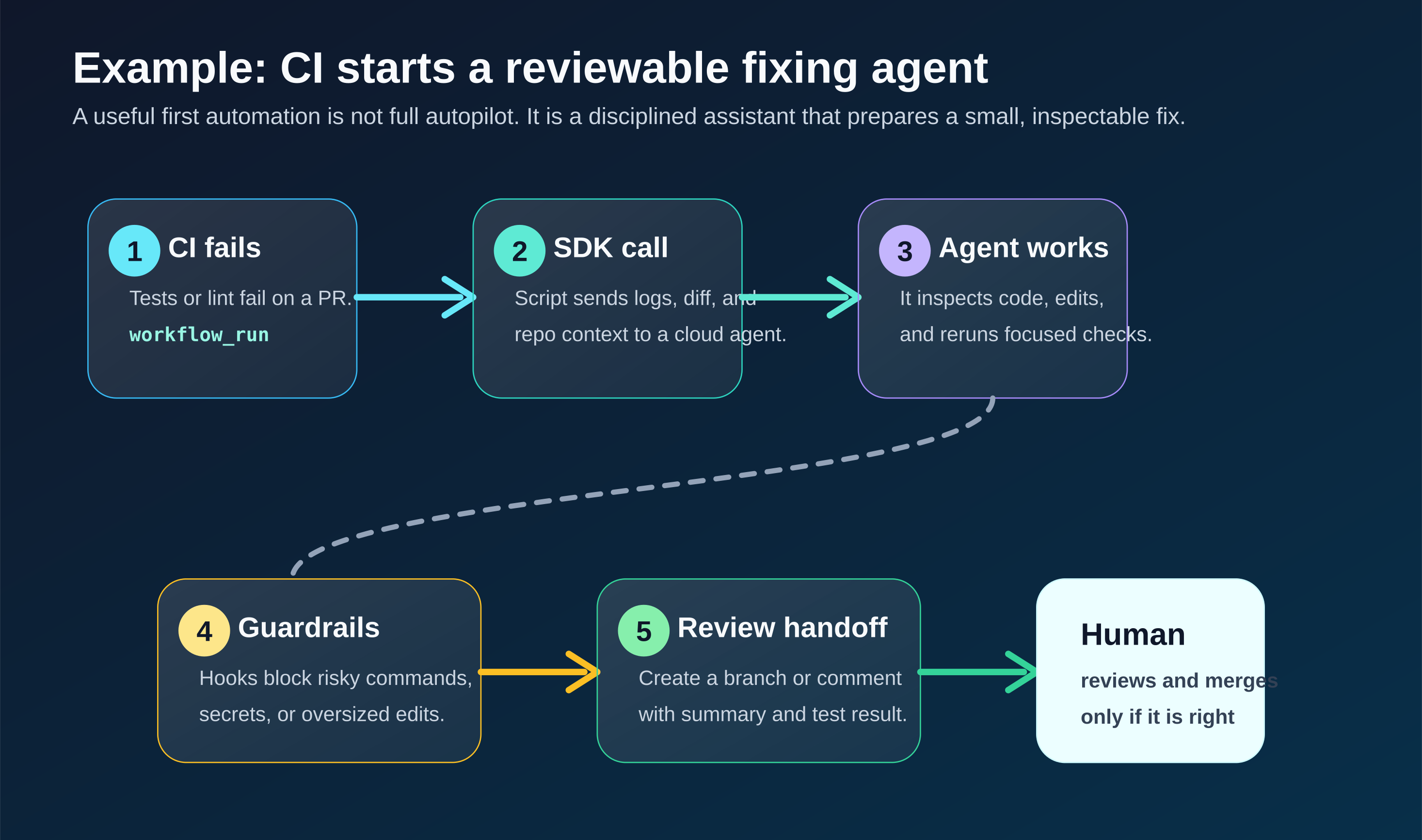
The most obvious use is CI/CD. Instead of merely sending “CI failed,” an agent can read logs, inspect the PR diff, locate a likely cause, propose a small fix, run focused tests, and create a reviewable branch.
Internal developer platforms are another fit. Issue trackers, release systems, quality dashboards, knowledge bases, and alert platforms can start agents based on user actions or events.
Product embedding is possible too. If your product manages projects, scripts, data pipelines, integrations, or configuration, the SDK can make an agent part of the product instead of a separate chat window.
Long-term maintenance tasks also fit:
- Dependency upgrade checks
- Flaky test investigation
- TODO scanning
- Documentation sync
- Changelog drafts
- Deprecated API migration
- Small security fixes
Cloud runtime also enables parallel exploration across repositories, modules, or candidate approaches.
Example: CI Failure Repair Agent
The first version should not automatically fix and merge everything. A safer workflow is:
- CI fails.
- Start an agent.
- Agent diagnoses the failure.
- Agent attempts a minimal fix if low risk.
- Agent runs focused tests.
- Agent returns summary and branch/PR for human review.
Simplified script:
import { Agent } from "@cursor/sdk";

const prUrl = process.env.PR_URL!;
const repoUrl = process.env.REPO_URL!;
const failingJobUrl = process.env.FAILING_JOB_URL!;

const agent = await Agent.create({
  apiKey: process.env.CURSOR_API_KEY!,
  name: `ci-fix: ${prUrl}`,
  model: { id: "composer-2" },
  cloud: {
    repos: [{ url: repoUrl, prUrl }],
    autoCreatePR: false,
  },
});

const run = await agent.send(`
You are helping with a failing pull request.

PR: ${prUrl}
Failing CI job: ${failingJobUrl}

Please:
1. Inspect the failing checks and PR diff.
2. Identify the smallest likely root cause.
3. If the fix is low risk, apply it on the PR branch.
4. Run focused test or lint commands.
5. Return files changed, commands run, and remaining risk.

Do not make broad refactors. Do not touch unrelated files.
`);

for await (const event of run.stream()) {
  if (event.type === "assistant") {
    for (const block of event.message.content) {
      if (block.type === "text") process.stdout.write(block.text);
    }
  }
}

const result = await run.wait();
console.log(result.status);
console.log(result.git?.branches?.[0]?.prUrl);
For a real GitHub Actions integration, add permission boundaries. Use service accounts or low-privilege keys. Start with comment-only mode when possible. Only allow branch pushes for trusted cases.
Trigger conditions should also be narrow. Lint, unit tests, type checks, and documentation builds are good candidates. Deployment failures, permission failures, and production operations should start in diagnosis-only mode.
Hooks Are The Production Boundary
Without hooks, agent automation becomes “write a long prompt and hope it behaves.” That is not enough for team workflows.
Hooks let a repository enforce policy:
- Block dangerous shell commands.
- Prevent edits to sensitive files.
- Audit external MCP calls.
- Run formatters after file edits.
- Require validation evidence before stopping.
Command hooks read JSON from stdin and return JSON on stdout. Exit code 2 can block an action. Prompt-based hooks can use a fast model to judge natural-language conditions such as whether a command is read-only.
This makes Cursor usage rules a repository asset rather than a verbal convention.
What Not To Use It For Yet
The SDK was introduced as a public beta, so APIs may change. Avoid binding critical production workflows to unstable internal event payloads.
Treat tool-call args and result as defensive unknown data. Do not assume internal shell output formats will stay fixed.
Local runtime may not support all artifact workflows. If screenshots or generated artifacts matter, cloud runtime is a better fit.
Inline mcpServers may not survive resume because they often contain secrets. Pass them again or use file-based configuration.
Hooks are file-based. That is good: hooks are repository or organization policy and should not be casually bypassed by each SDK caller.
Why This Matters For Cursor
The center of AI coding is moving from editor completion to agents running workflows. Cursor SDK is a direct response to that shift.
If Cursor stayed only inside the IDE, it would be compared endlessly with Claude Code, Codex, Copilot, and other entry points. With SDK, Cursor becomes more than an interface. It becomes an agent runtime that organizations can call.
IDE, CLI, Web App, Cloud Agents, SDK, MCP, hooks, skills, and subagents together form a more serious platform story: not just “a nice editor,” but infrastructure for handing code tasks to agents.
How I Would Start
I would begin with a narrow internal workflow:
- CI failure diagnosis, not auto-merge.
- Comment or branch creation, not direct main-branch writes.
- Strong hooks.
- Full event logging.
- Human review before merge.
Once that is stable, expand into dependency maintenance, documentation sync, and recurring engineering chores.
Follow ZiCode on WeChat
If this post was useful, you can follow later updates on WeChat as well.

X / Twitter
Follow @ax2_zicode
Faster technical notes, short thoughts, and new-post alerts are posted on X.
