Can Gemma 4 12B on Ollama Read Video Directly?
This week I wanted to verify a question that looks simple but is easy to confuse: can gemma4:12b on Ollama directly accept an MP4 as input?
In official materials, Gemma 4 12B is a multimodal model and does support video understanding based on frame sequences. But engineering integration has another boundary: what format does the local inference framework actually accept? The local test result was clear: with Ollama 0.30.5, an MP4 cannot be sent directly to the API, and a file path is not automatically read. The usable path is to extract frames first and pass the continuous frames as multiple images.
This small detail is worth writing down because “the model supports video” and “the API accepts video files” are often collapsed into the same sentence. They are not the same thing.
Conclusion First
The conclusion of this test has two layers:
- Gemma 4 12B supports video understanding at the model level. Google’s Gemma 4 model card states that all Gemma 4 models support image input and can process videos as frames. E2B, E4B, and 12B also support audio input. The recommended video assumption is about 1 FPS, with a maximum of roughly 60 seconds.
- The Ollama interface on the local test machine could not treat MP4 as native video input. Ollama’s current Vision documentation passes images through an
imagesarray; the REST API expects base64 images. Putting MP4 base64 into theimagesfield produced400 Failed to load image or audio file.
So the correct engineering statement is:
When using gemma4:12b on Ollama to analyze video, the recommended flow is not “send MP4 directly.” It is “extract frames -> send multiple images -> ask the model to reason over the continuous frames.”
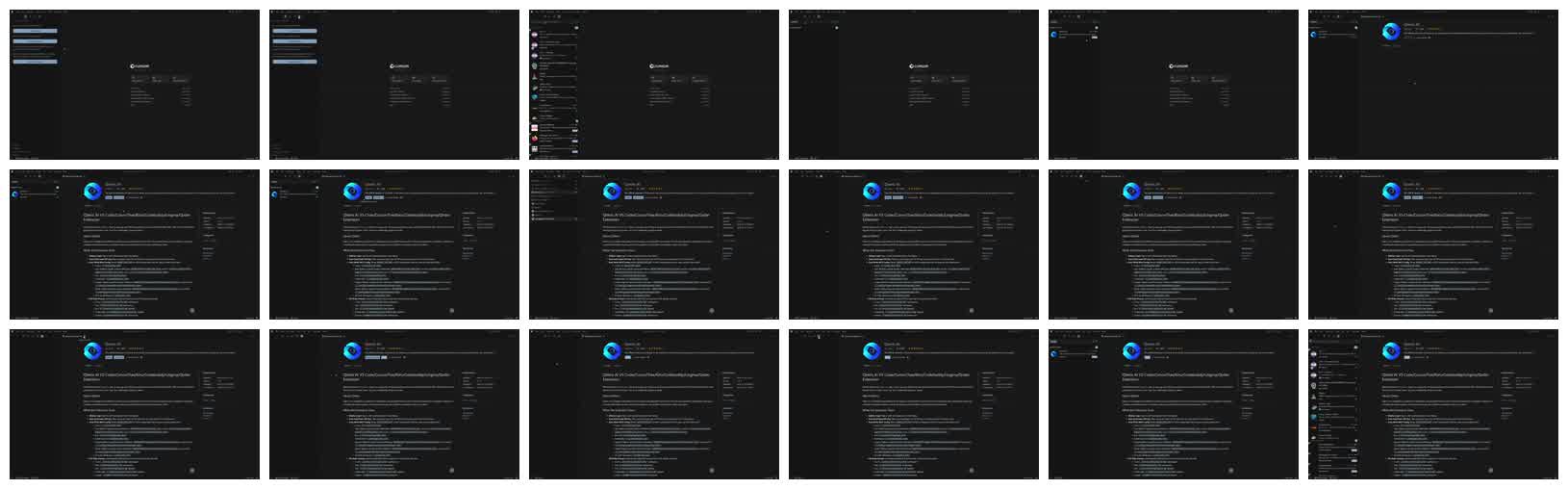
Figure 1: 18 continuous frames extracted from 2.mp4 at 0.5 FPS. The video shows searching for, viewing, and installing an extension in Cursor’s extension marketplace.
Why This Test Matters
In multimodal-model marketing materials, “supports video” can mean several different things:
- The model architecture and training support frame sequences, temporal relations, and audio.
- The inference framework can decode video files into frames and pass them to the model.
- The API can directly upload MP4/MOV/WebM.
- The client automatically performs frame extraction, compression, and prompt construction.
- The model only accepts multiple images, while video handling is left to the user.
These layers are easy to mix together. For real development, the difference is critical. If an online service only supports an image array, then “the model supports video” does not mean “the interface can upload video files directly.” This experiment verifies the real usable boundary on a local test machine and gives a reusable engineering path.
Official Documentation Check
Gemma 4 12B: The Model Supports Frame-Sequence Video Understanding
Google’s Gemma 4 model card says Gemma 4’s expanded multimodal capabilities cover text, image, video, and audio. Native audio support is present in E2B, E4B, and 12B. The card also says all models support image input and can process video as frames. Audio is capped at about 30 seconds, and video is about 60 seconds under a 1 FPS assumption.
The Google Developers Blog guide for Gemma 4 12B gives a concrete example: when processing a roughly five-minute video, they first extract 313 frames at 1 FPS, then feed the frames, audio, and question to Gemma 4 12B. This example shows that in practice, Gemma 4 12B video understanding is still often a combination of frame sequence, prompt, and optional audio.
Ollama: The Public Interface Mainly Exposes Image Input
Ollama’s gemma4 model page marks gemma4:12b input as Text, Image, with a 256K context window. Ollama’s Vision documentation also gives the current usage clearly: vision models receive images through an images array. SDKs can pass paths, URLs, or bytes; the REST API needs base64-encoded images.
In other words, at the Ollama layer, the available visual entry point for gemma4:12b is “images,” not “video files.” If we want to process video, the caller needs to extract frames first.
Test Environment
The Ollama and model information on the local test machine:
$ ollama --version
ollama version is 0.30.5

$ ollama list
NAME          ID              SIZE      MODIFIED
gemma4:12b    4eb23ef187e2    7.6 GB    9 days ago
...

$ ollama show gemma4:12b
Model
  architecture        gemma4
  parameters          11.9B
  context length      262144
  quantization        Q4_K_M
  requires            0.30.5

Capabilities
  completion
  vision
  audio
  tools
  thinking
The test video:
2.mp4: ISO Media, MP4 Base Media v1
video: h264, 2560x1540, 30 fps
audio: aac
duration: 35.300000 seconds
size: 2002349 bytes
Experiment One: Put the MP4 Path in the Prompt
First, I tried the most naive approach:
ollama run gemma4:12b "请用一句话回复:你能看见这个视频文件吗?/tmp/gemma4-video-2.mp4"The model replied, in essence, that it could not access a local filesystem path unless the file content was actually uploaded into the conversation.
This is expected. Simply writing /tmp/gemma4-video-2.mp4 in a prompt gives the model only a piece of text. The Ollama CLI did not automatically decode and load the MP4 as video input.
Experiment Two: Put MP4 Base64 Into the images Field
Next I tried the REST API: base64-encode the MP4 file and put it into the images array.
import base64
import json
import urllib.request
import urllib.error

mp4 = base64.b64encode(open("/tmp/gemma4-video-2.mp4", "rb").read()).decode()

payload = {
    "model": "gemma4:12b",
    "prompt": "请描述这个视频。",
    "images": [mp4],
    "stream": False,
    "options": {"num_predict": 80},
}

req = urllib.request.Request(
    "http://localhost:11434/api/generate",
    data=json.dumps(payload).encode(),
    headers={"Content-Type": "application/json"},
)

try:
    with urllib.request.urlopen(req, timeout=90) as r:
        print(r.read().decode())
except urllib.error.HTTPError as e:
    print("HTTPError", e.code, e.read().decode())
The response:
{
  "error": "{\"error\":{\"code\":400,\"message\":\"Failed to load image or audio file\",\"type\":\"invalid_request_error\"}}"
}
This is the most important negative case in the whole test. It shows that Ollama’s images field does not treat MP4 as video, and it does not automatically extract frames.
Experiment Three: Extract Frames and Send Them as Multiple Images
Since both official materials and Ollama documentation point to frame sequences, the next step was manual frame extraction. 2.mp4 is 35.3 seconds long. At 1 FPS it would produce 35 images. To control visual tokens and latency in the main test, I extracted 18 frames at 0.5 FPS:
ffmpeg -hide_banner -loglevel error \
  -i 2.mp4 \
  -vf fps=0.5,scale=800:-1 \
  /tmp/gemma4-video2-frames/frame_%03d.jpg
The extracted frames:
frame_001.jpg  800x481
frame_002.jpg  800x481
...
frame_018.jpg  800x481
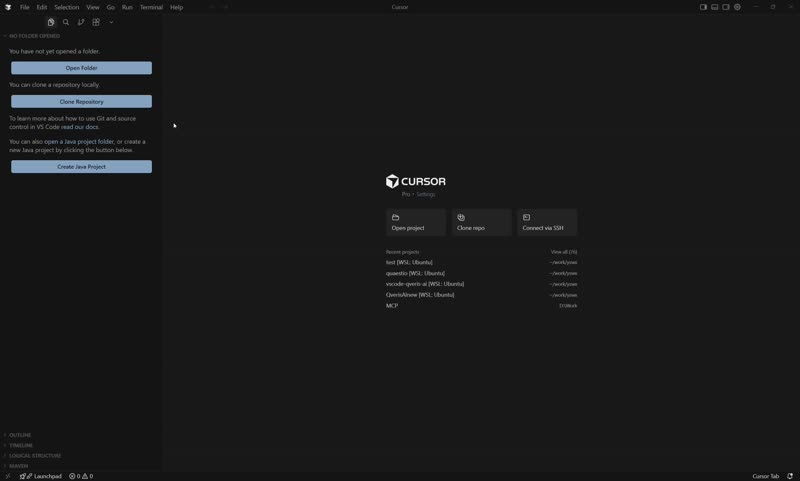
Frame 1:
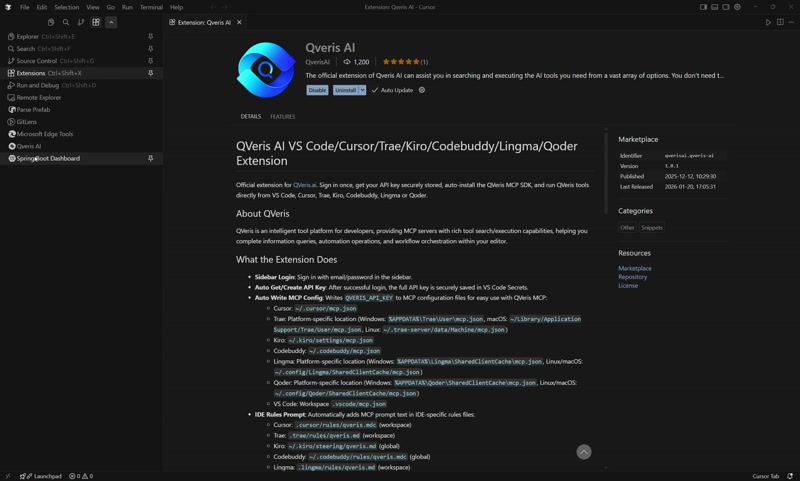
Frame 9:
Frame 18:
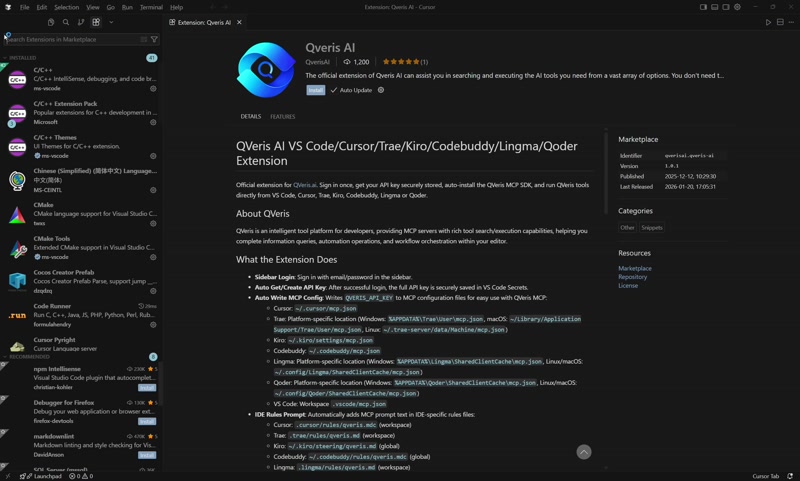
Then I called /api/chat and put the 18 images into messages[].images:
import base64
import json
import pathlib
import urllib.request

frames = sorted(pathlib.Path("/tmp/gemma4-video2-frames").glob("frame_*.jpg"))
imgs = [base64.b64encode(p.read_bytes()).decode() for p in frames]

payload = {
    "model": "gemma4:12b",
    "stream": False,
    "think": False,
    "messages": [
        {
            "role": "user",
            "content": (
                "这些图片是同一个 35.3 秒视频按 0.5 FPS 抽取的连续帧,按时间顺序排列。"
                "请只输出最终答案,不要输出思考过程。"
                "用中文概括视频内容,并指出画面里的主要对象、关键变化和不确定点。"
            ),
            "images": imgs,
        }
    ],
    "options": {
        "num_predict": 420,
        "temperature": 0.2,
    },
}

req = urllib.request.Request(
    "http://localhost:11434/api/chat",
    data=json.dumps(payload).encode(),
    headers={"Content-Type": "application/json"},
)

with urllib.request.urlopen(req, timeout=180) as r:
    data = json.loads(r.read().decode())
    print(data["message"]["content"])
The model summarized the video as follows:
This video shows a user installing the “Qweris AI” extension package in the Cursor editor. The main objects include the Cursor editor interface, the Extensions sidebar, and the “Qweris AI” extension detail page. The key change is that the user first searches for “Qweris” in the extension marketplace, then opens the “Qweris AI” detail page, and finally clicks the blue “Install” button to start installation. Since the video ends immediately after clicking install, it is not possible to confirm whether the extension installation completed or what later configuration steps followed.
This shows that multi-image input after frame extraction works. The model not only identified the visual subject, but also connected continuous frames into a relatively complete operation flow.
This test also exposed two details:
gemma4:12bhas thinking behavior by default. In the first run,num_predictwas too small; the token budget was consumed by thinking, somessage.contentwas empty, even thoughmessage.thinkinghad already identified the scene. Adding"think": falselater produced a clean final answer.- 0.5 FPS was enough to cover the key points in this extension-installation video. But if the goal is to inspect post-install status, popup details, or terminal output, higher frame rate or regional cropping is still needed.
What This Result Is Useful For
1. Clarify the Real Engineering Meaning of “Video Support”
“Video understanding” in a model card does not automatically equal “the server API can receive MP4 directly.” In this environment, the real boundary was:
Direct MP4 input: not usable
MP4 path input: not usable; it is only text
JPG/PNG frames as image input: usable
This matters for service design. If a product says “supports video analysis,” it should state the implementation chain: upload video, extract frames, sample, compress, call the VLM, and aggregate the result. It should not rely only on a model name.
2. Provide a Low-Cost Path for Local Private Video Analysis
This test used a locally deployed gemma4:12b through Ollama, so the video content did not need to leave the machine. That is useful for:
- Screen-recording summaries.
- QA for web-product operation recordings.
- First-pass filtering of monitoring clips.
- Educational video segment descriptions.
- Drafting video chapters automatically.
- Visual structuring of recorded meetings or demos.
If the video is short and the scene changes slowly, 1 FPS to 2 FPS is often enough. Compared with full video-encoding input, frame extraction is more transparent and easier to control.
3. Reveal Key Parameters in Local VLM Workflows
In this test, the most important factors were not simply whether the model could “see.” They were these engineering parameters:
- Frame rate: 1 FPS can work for static UI; fast action, sports, gestures, and games may need 3-10 FPS.
- Resolution: 640 px width is enough for summaries; OCR, code, and tables need higher resolution or local crops.
- Frame count: more frames mean more visual tokens, more latency, and more memory pressure.
- Thinking switch: for stable API output, explicitly set
think: false. - Output length: too small a
num_predictcan truncate answers, especially for thinking models.
Comparison With Similar Open Models
The comparison below only discusses video / multi-frame understanding and engineering usage. It is not a full model leaderboard. Apart from Gemma 4 12B, the other models were not individually tested in this local environment; the summary is based on official model cards, papers, or project documentation.
| Model | Size Positioning | Video Capability | Engineering Entry | Good For | Notes |
|---|---|---|---|---|---|
| Gemma 4 12B | About 12B; tested here as Q4_K_M 7.6 GB | Google docs say it can process video as frames; 12B supports audio input | On Ollama, mainly use image arrays; direct MP4 did not work | Local short-video summaries, screen-recording analysis, image+text reasoning | Caller must extract frames; thinking behavior should be controlled |
| Qwen2.5-VL-7B | 7B | Official materials emphasize long-video understanding, beyond one hour, with event localization | Transformers / qwen-vl-utils can load video; deployment depends on framework | Long-video search, event localization, mixed document/chart/OCR tasks | 7B differs from 72B in quality; video chain depends on inference framework |
| Qwen3-VL-8B / 32B | 8B to 32B | Technical report says native 256K multimodal context, integrating text, image, and video with stronger spatiotemporal modeling | Transformers, vLLM, and related ecosystem support | New projects, long-context video, complex multi-image reasoning | As of this article, local framework maturity and GPU memory still need attention |
| MiniCPM-V 4.5 | 8B | Model card emphasizes high-FPS and long-video understanding, up to 10 FPS, with efficient video-token compression | Hugging Face / Ollama related model pages | Edge deployment, mobile, cost-effective local video understanding | Ecosystem is smaller than Qwen; video input depends on runtime |
| GLM-4.1V-9B-Thinking | 9B | Multimodal reasoning across image, video, documents, and GUI agents | Hugging Face / Xinference and related tools | Visual/video questions requiring reasoning chains, Chinese tasks | Thinking output control and latency require evaluation |
| LLaVA-OneVision-7B | 7B | Unified single-image, multi-image, and video understanding; an early representative open video VLM | Transformers / LLaVA toolchain | Academic reproduction, lightweight video-understanding baseline | OCR, long-video, and tool capabilities may lag behind newer 2026 models |
| Llama 4 Scout | 17B active / 109B total; not same memory tier | Meta describes it as natively multimodal; Llama docs focus on text + up to 5 images | Ollama can run vision; model card focuses on image input | Multi-image reasoning, long-context text tasks | Much higher resource requirement; not a direct 12B-class replacement |
A practical decision rule:
- If you only want quick video summaries in an existing Ollama environment: keep using
gemma4:12band extract frames yourself. - If long-video event localization matters: look first at Qwen2.5-VL / Qwen3-VL.
- If small-model high-FPS video understanding matters: evaluate MiniCPM-V 4.5.
- If complex visual reasoning and Chinese QA matter: evaluate GLM-4.1V-9B-Thinking.
- If stable engineering ecosystem matters: Qwen-family models and Ollama-supported models are usually easier to integrate.
How to Turn Video Input Into a Usable Service
Recommendation One: Do Not Start by Chasing Native MP4 Input
In the current local open-model ecosystem, frame extraction remains the steadiest abstraction layer. It has several benefits:
- Controllable: you explicitly control FPS, resolution, and maximum frames.
- Cacheable: extracted frames can be reused for multiple questions.
- Explainable: when the model is wrong, you can inspect the exact frames.
- Replaceable: if the underlying model changes from Gemma to Qwen/MiniCPM/GLM, upper-layer video preprocessing can remain mostly unchanged.
Recommendation Two: Choose Frame Strategy by Task
| Task | Suggested Sampling | Resolution | Prompt Focus |
|---|---|---|---|
| Screen-recording summary | 1 FPS | 640-960 px width | Pages, modules, operation changes |
| Tutorial / demo video | 1-2 FPS | 720-960 px width | Steps, key screens, chapters |
| Monitoring clip triage | 1-3 FPS | 640-1280 px width | People, vehicles, abnormal actions |
| Fast action / games | 3-10 FPS | 640-960 px width | Time order and motion changes |
| OCR / code / tables | Low FPS + high resolution or crops | 1080p or cropped | Text reading and field extraction |
Recommendation Three: State Clearly That These Are Ordered Frames
Do not only say “describe these images.” A better prompt is:
这些图片是同一个视频按时间顺序抽取的连续帧。
请基于帧序列概括视频内容,指出主要对象、动作变化和不确定之处。
如果画面变化很小,请明确说明它基本是静态画面。
This reduces the chance that the model treats the frames as unrelated images.
Recommendation Four: Use Structured Output for Product Integration
For services, ask the model to output JSON:
{
  "summary": "One-sentence summary",
  "main_objects": ["object 1", "object 2"],
  "timeline": [
    {"time_range": "0-3s", "event": "event description"},
    {"time_range": "4-8s", "event": "event description"}
  ],
  "uncertainties": ["uncertain points"]
}
In implementation, map frame numbers back to timestamps. For example, in this test at 0.5 FPS, frame_009.jpg is roughly around the 18-second mark.
Minimal Reusable Flow
1. Extract Frames
VIDEO=2.mp4
OUT=/tmp/video-frames
mkdir -p "$OUT"

ffmpeg -hide_banner -loglevel error \
  -i "$VIDEO" \
  -vf fps=0.5,scale=800:-1 \
  "$OUT/frame_%03d.jpg"
2. Call Ollama
import base64
import json
import pathlib
import urllib.request

frames = sorted(pathlib.Path("/tmp/video-frames").glob("frame_*.jpg"))
imgs = [base64.b64encode(p.read_bytes()).decode() for p in frames]

payload = {
    "model": "gemma4:12b",
    "stream": False,
    "think": False,
    "messages": [
        {
            "role": "user",
            "content": (
                "这些图片是同一个视频按时间顺序抽取的连续帧。"
                "请用中文输出:1. 摘要;2. 主要对象;3. 明显变化;4. 不确定点。"
            ),
            "images": imgs,
        }
    ],
    "options": {"temperature": 0.2, "num_predict": 512},
}

req = urllib.request.Request(
    "http://localhost:11434/api/chat",
    data=json.dumps(payload).encode(),
    headers={"Content-Type": "application/json"},
)

with urllib.request.urlopen(req, timeout=180) as r:
    print(json.loads(r.read().decode())["message"]["content"])
Limits and Follow-Up Tests
This experiment only verified one 35.3-second screen-recording video: searching, viewing details, and clicking install in an IDE extension marketplace. The conclusion should not be blindly generalized to all video tasks. Useful follow-up tests include:
- Dynamic video tests: people moving, vehicles, gestures, or game scenes, to observe temporal understanding.
- Different FPS comparison: accuracy, latency, and memory impact for 1 FPS, 2 FPS, 5 FPS, and 10 FPS.
- Different model comparison: run the same video through Gemma 4 12B, MiniCPM-V 4.5, Qwen2.5-VL-7B, and GLM-4.1V-9B.
- Audio chain test: extract WAV from MP4 and verify Ollama’s actual support for Gemma 4 12B audio input.
- Structured-output stability: run the same video multiple times and check JSON format, key objects, and timeline consistency.
Summary
The core value of this experiment is not to prove whether Gemma 4 12B is “strong.” It is to separate an easily misunderstood product question:
A model supporting video understanding does not mean the current deployment interface supports direct video-file upload.
In the tested Ollama 0.30.5 environment, the usable path for gemma4:12b is to extract frames and send them as multiple images. This is less elegant than “send MP4 directly,” but it is transparent, stable, and controllable. It is a good starting point for local video summaries and visual QA prototypes.
For development and product decisions, the result gives a clear recommendation: if the goal is short videos and screen-recording summaries, gemma4:12b + ffmpeg frame extraction + Ollama images is already usable. If the goal is long video, action-event localization, or high-FPS understanding, then Qwen3-VL, Qwen2.5-VL, MiniCPM-V 4.5, and other video-oriented open models should be evaluated further.
References
- Ollama Gemma 4 model page: https://ollama.com/library/gemma4
- Ollama Vision documentation: https://docs.ollama.com/capabilities/vision
- Google Gemma 4 model card: https://ai.google.dev/gemma/docs/core/model_card_4
- Google Gemma 4 12B Developer Guide: https://developers.googleblog.com/gemma-4-12b-the-developer-guide/
- Google Gemma + Ollama integration documentation: https://ai.google.dev/gemma/docs/integrations/ollama
- Qwen2.5-VL Technical Report: https://arxiv.org/abs/2502.13923
- Qwen2.5-VL official blog: https://qwen.ai/blog?id=qwen2.5-vl
- Qwen3-VL Technical Report: https://arxiv.org/abs/2511.21631
- Qwen3-VL GitHub: https://github.com/QwenLM/Qwen3-VL
- MiniCPM-V GitHub: https://github.com/openbmb/MiniCPM-V
- MiniCPM-V 4.5 Hugging Face: https://huggingface.co/openbmb/MiniCPM-V-4_5
- GLM-V GitHub: https://github.com/zai-org/GLM-V
- LLaVA-OneVision project introduction: https://llava-vl.github.io/blog/2024-08-05-llava-onevision/
- Llama 4 model card: https://www.llama.com/docs/model-cards-and-prompt-formats/llama4/
Follow ZiCode on WeChat
If this post was useful, you can follow later updates on WeChat as well.

X / Twitter
Follow @ax2_zicode
Faster technical notes, short thoughts, and new-post alerts are posted on X.
