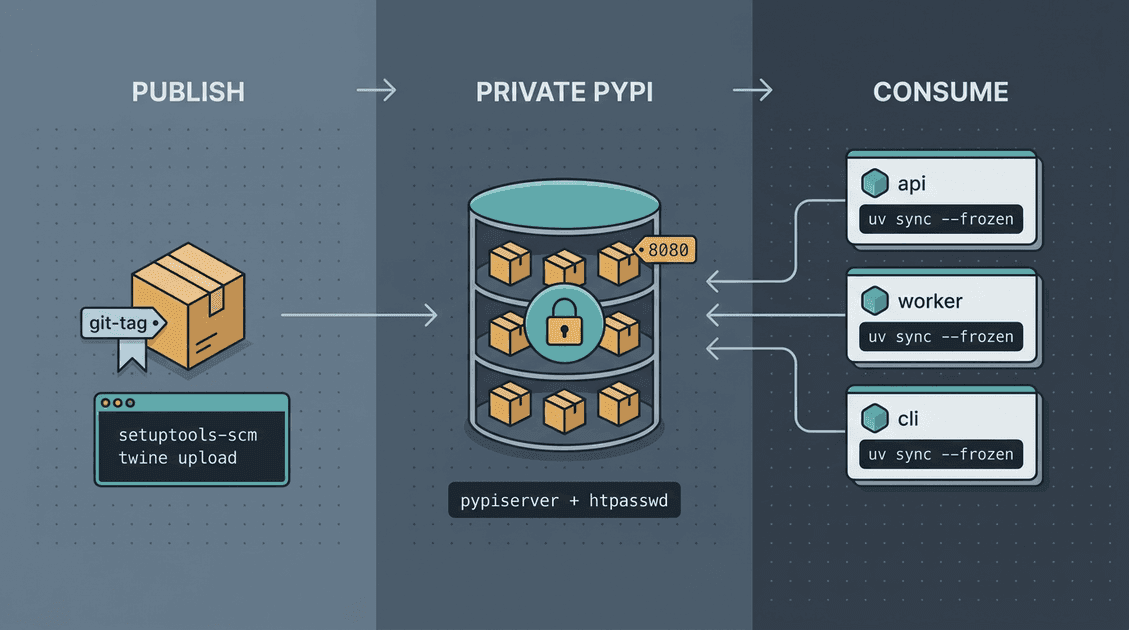
Private PyPI With pypiserver And uv
Private PyPI With pypiserver And uv
When internal code grows, shared libraries quickly appear. The easiest early solution is often a git submodule. After a year or two, the drawbacks become obvious: Docker builds need git, CI has to check out another layer, local clones require --recursive, and branch switching can leave submodules at confusing SHAs.
This article records a practical migration from submodules to a private PyPI workflow:
- Run
pypiserverwith authentication. - Use PEP 440 versioning without confusing
uvorpip. - Publish with
setuptools-scmwhile embedding_version.py. - Consume packages with
uv. - Pass credentials into Docker builds using BuildKit secrets.
- Avoid common CI publishing mistakes.
All concrete service names, package names, and repository names below are sanitized examples.
Why Move Away From Submodules
Private PyPI does not magically reduce downstream update count. If one shared library has N consumers, N downstream updates are still needed. The real difference is where the change lands and how it is reviewed.
With submodules, versions are tied to git SHAs and local workflow. pull, branch switching, and submodule update all become part of dependency state. If two environments point to different SHAs, it is hard to tell whether that was intentional.
With a private package index, released wheels and source distributions enter the index. The consuming service installs exactly what its uv.lock says, especially when CI runs with --frozen. If no new version is released and no lockfile changes, the environment does not drift because upstream pushed a commit.
Version numbers plus lockfile diffs are also easier to read than submodule pointer diffs. A PR that changes shared-lib from 1.0.1 to 1.0.5 is clearer than two unrelated commit hashes.
The important separation is publishing versus adoption. Publishing puts an artifact into the index. Adoption changes a downstream lockfile and merges a PR. That boundary is worth a lot.
Run pypiserver
pypiserver is intentionally simple: a WSGI app serving .whl and .tar.gz files from a local directory, with htpasswd-based authentication.
Create directories:
mkdir -p ~/pypi/{auth,packages}
cd ~/pypi
Create an upload user:
htpasswd -sc auth/.htpasswd uploaderThen a minimal docker-compose.yml:
services:
  pypiserver:
    image: pypiserver/pypiserver:latest
    restart: always
    ports:
      - "8080:8080"
    volumes:
      - ./auth:/data/auth:ro
      - ./packages:/data/packages
    command: >
      run -P /data/auth/.htpasswd
          -a update,download,list
          --hash-algo sha256
          /data/packages
Start it:
docker compose up -d
curl -u uploader:**** http://<host>:8080/simple/
If you expose it beyond a trusted network, put TLS in front of it. Basic authentication over plain HTTP should not be exposed publicly.
Versioning: Keep PEP 440 Simple
Python packaging version behavior is governed by PEP 440. A practical subset:
| Version | Meaning | Use Case |
|---|---|---|
1.2.0 | final release | normal release |
1.2.0.dev3 | development release before 1.2.0 | CI pre-release |
1.2.0a1, b2, rc1 | alpha, beta, release candidate | visible pre-release |
1.2.0.post1 | post release after 1.2.0 | metadata or packaging correction |
1.2.0+internal.4 | local version | local/downstream build, usually not for upload |
Two common mistakes:
.postNis not a bugfix version. Use1.2.1for a bugfix.- Avoid epoch versions such as
1!1.0unless you really have a legacy versioning problem.
For internal packages, a clean rule is enough:
- Use
MAJOR.MINOR.PATCH. - Let CI append a safe derived suffix if needed.
- Use normal PEP 440 dependency ranges.
Example:
[project]
dependencies = [
  "shared-lib ~= 1.2",
  "cli-tool ~= 1.2.0",
]
~= is useful: ~= 1.2 means compatible with 1.x; ~= 1.2.0 is stricter and stays within 1.2.x.
Publishing: setuptools-scm And _version.py
setuptools-scm can derive versions from git tags, but it may call git describe. Inside Docker or editable installs without git, that can fail:
command git missing
setuptools-scm was unable to detect version
The fix is not to install git everywhere. Write the version into the source distribution:
[tool.setuptools_scm]
write_to = "shared_lib/_version.py"
fallback_version = "0.0.0+nogit"
Then in shared_lib/__init__.py:
try:
    from ._version import version as __version__
except ImportError:
    __version__ = "0.0.0+nogit"
When building, _version.py is included in the package, so downstream installs do not need git.
A simple publish script:
# 1. git fetch --tags --force
# 2. python -m build --wheel --sdist
# 3. twine upload --repository-url http://<host>:8080/
#    -u $PYPI_USERNAME -p $PYPI_PASSWORD dist/*
In CI, keep “upload package” separate from “create GitHub release.” Uploading wheel/sdist should happen for the package release flow; GitHub release metadata may depend on tags or manual inputs.
Consuming With uv
In pyproject.toml, bind specific packages to an internal index:
[project]
dependencies = [
  "shared-lib ~= 1.2",
  "cli-tool ~= 1.2",
]

[tool.uv.sources]
shared-lib = { index = "internal" }
cli-tool = { index = "internal" }

[[tool.uv.index]]
name = "internal"
url = "http://<host>:8080/simple/"
If the server uses HTTP inside a trusted network, configure the trusted host in the environment or uv/pip-compatible settings as needed. For production-facing networks, use HTTPS.
Typical operations:
uv lock --upgrade-package shared-lib
uv sync --frozen
uv tree
uv pip show shared-lib
uv.lock should be committed. It is the adoption record. CI should use --frozen to prevent accidental dependency drift.
Docker BuildKit Secrets
Do not bake private index credentials into Docker images or Dockerfiles. Use BuildKit secrets.
One pattern is to provide a .netrc during build:
RUN --mount=type=secret,id=netrc,target=/root/.netrc \
    uv sync --frozen
Another is to pass user and password separately and write a temporary .netrc:
RUN --mount=type=secret,id=pypi_user \
    --mount=type=secret,id=pypi_pass \
    set -eu; \
    printf 'machine %s\nlogin %s\npassword %s\n' \
      "$PYPI_HOST" "$(cat /run/secrets/pypi_user)" "$(cat /run/secrets/pypi_pass)" > "$HOME/.netrc"; \
    chmod 600 "$HOME/.netrc"; \
    uv sync --frozen; \
    rm -f "$HOME/.netrc"
Common failures:
- BuildKit not enabled.
- Secret ID mismatch between workflow and Dockerfile.
.netrchost does not match index hostname.- Credentials accidentally printed in logs.
uv lockanduv sync --frozendisagree because lockfile was not updated.
Practical Rules
- Publish artifacts; do not install from random source directories in production.
- Commit lockfiles.
- Use
--frozenin CI and Docker. - Separate package publishing from downstream adoption.
- Use PEP 440 final versions for real fixes.
- Keep credentials out of images and logs.
- Prefer simple
pypiserverif you only need internal package hosting; move to devpi/Nexus only when you need richer permission and audit features.
Closing
Private PyPI does not remove dependency management work. It makes the work clearer. A release becomes an artifact in an index. Adoption becomes a lockfile change in a downstream repository. That separation is the real benefit.
Follow ZiCode on WeChat
If this post was useful, you can follow later updates on WeChat as well.

X / Twitter
Follow @ax2_zicode
Faster technical notes, short thoughts, and new-post alerts are posted on X.
