
Quant Trading for Programmers 23: Link The Daily Paper-Trading Flow
Quant Trading for Programmers 23: Link The Daily Paper-Trading Flow
Articles 17-22 have added many small modules. Each one can run on its own, but the system needs a complete chain when it runs every day.
Article 23 adds the paper-trading daily flow, linking snapshots, risk controls, rebalancing, recommendations, daily reports, and reviews into one testable run result.
Start With Pure Function Orchestration
This chapter still does not introduce APScheduler, Celery, or crontab.
The reason is that the process order matters more right now than the runner. As long as the core orchestration is a pure function, connecting any scheduler later will be easier.
“Pure function orchestration” here does not mean there is no calculation inside. It means the function does not send messages directly, write to a database, or mutate the account. It receives the account, market prices, target weights, and trade date, then returns a set of results. If something fails, it can be rerun directly; in tests, no external service is required.
Daily Flow Result
Chapter 23 adds app/paper_daily_cycle.py.
@dataclass(frozen=True)
class PaperDailyCycleResult:
    snapshot: PaperAccountSnapshot
    risk_report: PaperRiskReport
    rebalance_plan: RebalancePlan
    recommendation: PaperRecommendation
    alert_message: PaperAlertMessage
    review_record: PaperReviewRecord
This object keeps the major daily artifacts together, making tests, logs, and later persistence easier.
Orchestration Entry Point
result = run_paper_daily_cycle(
    account,
    trade_date=date(2026, 1, 19),
    last_prices={"000001.SZ": 10.0},
    target_weights={"000001.SZ": 0.4},
)
Inside the function, the system generates the snapshot, risk report, rebalance plan, recommendation summary, daily alert message, and review record in order. It does not mutate the account and does not send messages.
Current Integrated Run
The daily flow can also be viewed through the paper-ops command:
uv run python -m scripts.chapter_examples paper-opsThe figure below keeps only the flow order and key output:
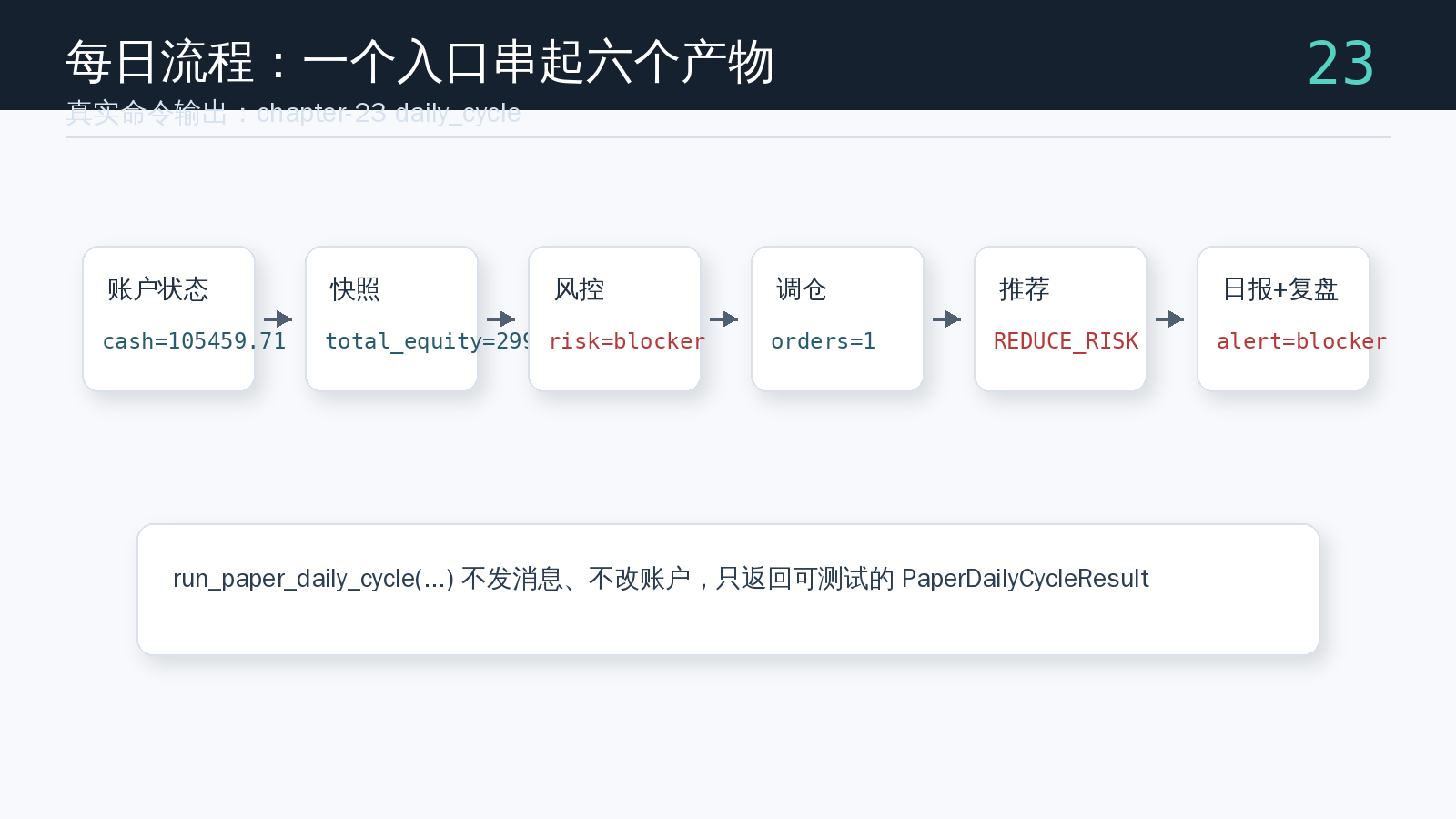
One daily flow should produce at least six types of objects: account snapshot, risk report, rebalance plan, recommendation summary, daily alert message, and review record. Putting these objects into PaperDailyCycleResult makes it possible to run production checks against the whole chain instead of testing one function at a time.
Why Not Execute Automatically Yet
Paper-trading automation should move slowly.
If the flow itself has not been tested clearly, connecting a scheduler too early only makes problems harder to locate. Article 23 first fixes “what should be calculated every day.” The next step is to discuss “when to calculate it and where to save the result.”
Chapter Update And Repository
This chapter adds:
app/paper_daily_cycle.py.- A daily paper-trading run result object.
- Orchestration across account snapshots, risk controls, rebalancing, recommendations, daily reports, and review records.
- An integrated
paper-opsexample showing the run order of the six daily artifacts. - Engineering context for decoupling pure function orchestration from schedulers.
tests/test_paper_daily_cycle.py, covering normal rebalance flows and blocker-level risk flows.
Repository:
https://github.com/ax2/zi-quant-platformCode for this chapter:
git clone https://github.com/ax2/zi-quant-platform.git
cd zi-quant-platform
git checkout chapter-23
uv sync --extra dev
uv run pytest tests/test_paper_daily_cycle.py
Chapter 23 is commit 9e6672c, tagged as chapter-23.
Summary
The daily flow is not just a pile of new features. It is boundary integration.
Article 23 links the previous modules into a stable entry point. The next article handles a practical problem: after the program restarts, where should the paper-trading account state be restored from?
Follow ZiCode on WeChat
If this post was useful, you can follow later updates on WeChat as well.

X / Twitter
Follow @ax2_zicode
Faster technical notes, short thoughts, and new-post alerts are posted on X.

More in this column
- Quant Trading for Programmers 27: Record Paper-Trading Daily Reports In Files
- Quant Trading for Programmers 26: Abstract Notification Channels First
- Quant Trading for Programmers 25: Add Production Checks To Paper Trading
- Quant Trading for Programmers 24: Persist Paper-Trading Account State
- Quant Trading for Programmers 22: Save Daily Paper-Trading Review Records
- Quant Trading for Programmers 21: Compress Paper-Trading Results Into A Recommendation Summary
- Quant Trading for Programmers 20: Generate Paper-Trading Daily Reports And Alert Summaries
- Quant Trading for Programmers 19: Generate Rebalance Plans From Target Weights