
Quant Trading for Programmers 32: Archive Daily Run Results As JSON
Quant Trading for Programmers 32: Archive Daily Run Results As JSON
Article 31 added a run window to the daily flow.
Article 32 handles evidence after a run: what alert was sent today, what the health status was, and what the review record said should all be written into a stable file.
Why Archive JSON First
In a real system, a daily report may be sent to a chat group, email, Lark, or a file, and later it may also enter a database.
During the paper-trading stage, I prefer to have a stable, diffable, replayable file first. JSON is direct enough and easy to test.
The archive contains three sections:
| Section | Source | Purpose |
|---|---|---|
alert | PaperAlertMessage | Records the title, body, and severity sent externally that day |
health | RunHealthReport | Records whether the run was healthy, plus missing-price and notification-receipt states |
review | PaperReviewRecord | Records equity, cash ratio, risk level, and recommended action |
The Archive Object
Chapter 32 adds app/report_archive.py.
@dataclass(frozen=True)
class ArchivedReport:
    path: Path
    trade_date: date
    status: str
ArchivedReport does not keep the full payload in memory. It only returns the archive path, trade date, and health status. The full content can be read from the file when needed.
Write A Stable File
The filename uses the trade date directly:
path = target_dir / f"{trade_date.isoformat()}-paper-report.json"The core write logic compresses existing objects into a stable payload:
payload = {
    "trade_date": trade_date.isoformat(),
    "alert": {
        "title": alert_message.title,
        "body": alert_message.body,
        "severity": alert_message.severity,
    },
    "health": {
        "status": health_report.status,
        "summary": health_report.summary,
        "issue_count": health_report.issue_count,
        "missing_price_count": health_report.missing_price_count,
        "notification_accepted": health_report.notification_accepted,
    },
    "review": {
        "total_equity": review_record.total_equity,
        "cash_ratio": review_record.cash_ratio,
        "risk_severity": review_record.risk_severity,
        "recommendation_action": review_record.recommendation_action,
        "note": review_record.note,
    },
}
The file is written with ensure_ascii=False and sort_keys=True. The first keeps Chinese reports readable. The second keeps the structure stable, which makes later troubleshooting easier.
The archive file acts like run evidence. It does not replace a database or logs. It stores the minimal loop that a daily report needs for later review: what was sent, what the system health was, and what the review record’s key fields were.
Current Integrated Run
Continue running the same command:
uv run python -m scripts.chapter_examples paper-ops-checkThe command writes two days of archives into a temporary directory. The current-day archive is named 2026-03-05-paper-report.json:
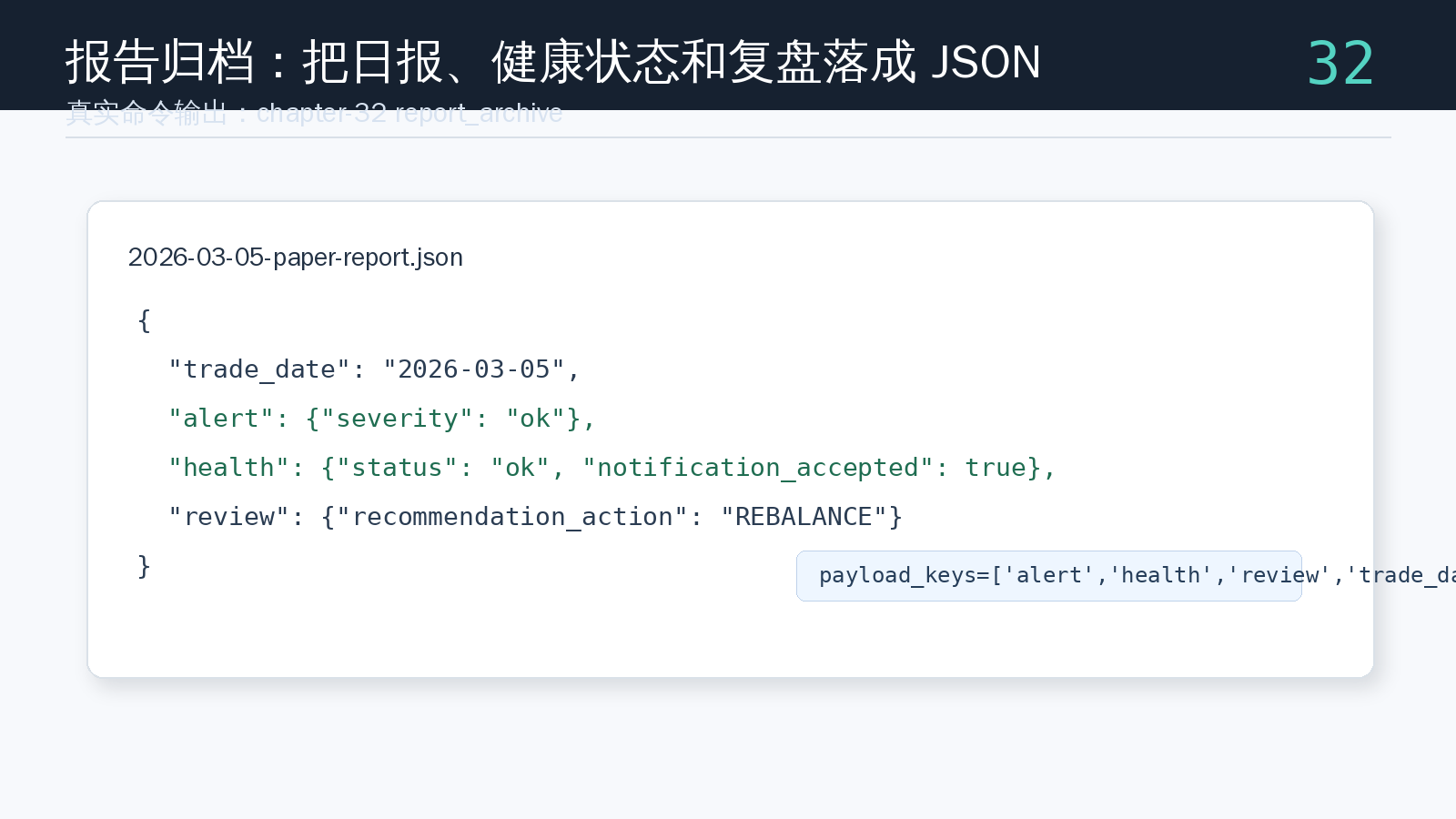
The screenshot shows that the archive payload consistently contains alert, health, review, and trade_date. Once those keys are stable, later history summaries and operations checklists do not need to parse the text body of the daily report.
Test The Archive Content
The tests use a temporary directory so they do not pollute the working tree.
uv run pytest tests/test_report_archive.pyKey assertions include:
assert archived.path.name == "2026-01-28-paper-report.json"
assert payload["trade_date"] == "2026-01-28"
assert payload["health"]["status"] == "ok"
assert payload["review"]["recommendation_action"] == "HOLD"
This confirms that the archive writes a file and preserves the fields needed for later statistics.
Chapter Update And Repository
This chapter adds:
app/report_archive.py.- The daily report archive object
ArchivedReport. - Stable JSON output for alert messages, health reports, and review records.
read_archived_report()for later archive reads.- An integrated
paper-ops-checkexample showing the real archive filename and payload structure. - The engineering role of archives as run evidence.
tests/test_report_archive.py, verifying filenames and key fields.
Repository:
https://github.com/ax2/zi-quant-platformCode for this chapter:
git clone https://github.com/ax2/zi-quant-platform.git
cd zi-quant-platform
git checkout chapter-32
uv sync --extra dev
uv run pytest tests/test_report_archive.py
Chapter 32 is commit 8504ea9, tagged as chapter-32.
Summary
Archiving is not about saving one more file. It is about giving each daily run evidence.
Article 32 writes the daily report, health status, and review record into stable JSON. The next article reads those archive files and generates a longer-term run-history summary.
Follow ZiCode on WeChat
If this post was useful, you can follow later updates on WeChat as well.

X / Twitter
Follow @ax2_zicode
Faster technical notes, short thoughts, and new-post alerts are posted on X.

More in this column
- Quant Trading for Programmers 36: Shape The Daily Run Request
- Quant Trading for Programmers 35: Generate An Operations Checklist
- Quant Trading for Programmers 34: Detect Market Data Gaps
- Quant Trading for Programmers 33: Summarize Paper-Trading Run History
- Quant Trading for Programmers 31: Add A Run Window To Daily Jobs
- Quant Trading for Programmers 30: Generate A Daily Run Health Report
- Quant Trading for Programmers 29: Generate Target Weights From A Candidate List
- Quant Trading for Programmers 28: Abstract Price Inputs Into Price Providers