
Quant Trading for Programmers 33: Summarize Paper-Trading Run History
Quant Trading for Programmers 33: Summarize Paper-Trading Run History
Article 32 wrote daily run results into JSON archives.
A single-day archive answers “what happened today.” Article 33 answers a different question: has this paper-trading system been stable recently?
What The History Summary Tracks
For now, there is no need for a complicated report. Four basic metrics are enough:
| Field | Meaning |
|---|---|
report_count | Number of archived reports |
latest_trade_date | Latest trade date |
latest_status | Latest health status |
blocker_count | Number of historical blockers |
notification_success_rate | Notification success rate |
These metrics support a practical judgment: if three of the last ten days were blockers, the problem is probably not strategy performance. It is likely somewhere in the run chain.
The Summary Object
Chapter 33 adds app/run_history.py.
@dataclass(frozen=True)
class RunHistorySummary:
    report_count: int
    latest_trade_date: str
    latest_status: str
    blocker_count: int
    notification_success_rate: float
This is not strategy-return statistics. It is run-quality statistics.
Read From The Archive Directory
The implementation is direct: read every *-paper-report.json file in the directory, sort by filename, then calculate the summary.
reports = []
for path in sorted(Path(directory).glob("*-paper-report.json")):
    reports.append(read_archived_report(path))
An empty directory should also return a clear result instead of throwing an exception.
if not reports:
    return RunHistorySummary(0, "", "missing", 0, 0.0)
For paper trading, missing is a useful state. It tells the caller that the system is not healthy yet; it simply has no history.
Notification Success Rate
The notification success rate is calculated from the health section in archived reports.
notification_count = sum(
    1 for item in reports
    if item["health"].get("notification_accepted")
)
The result is rounded to six decimal places:
notification_success_rate=round(notification_count / len(reports), 6)There is no pandas dependency and no chart here. A run-history summary should be light enough to call from a command line, an API, or a daily report without hesitation.
Current Integrated Run
paper-ops-check first writes a previous-day blocker archive, then writes today’s ok archive, and finally summarizes the archive directory:
uv run python -m scripts.chapter_examples paper-ops-check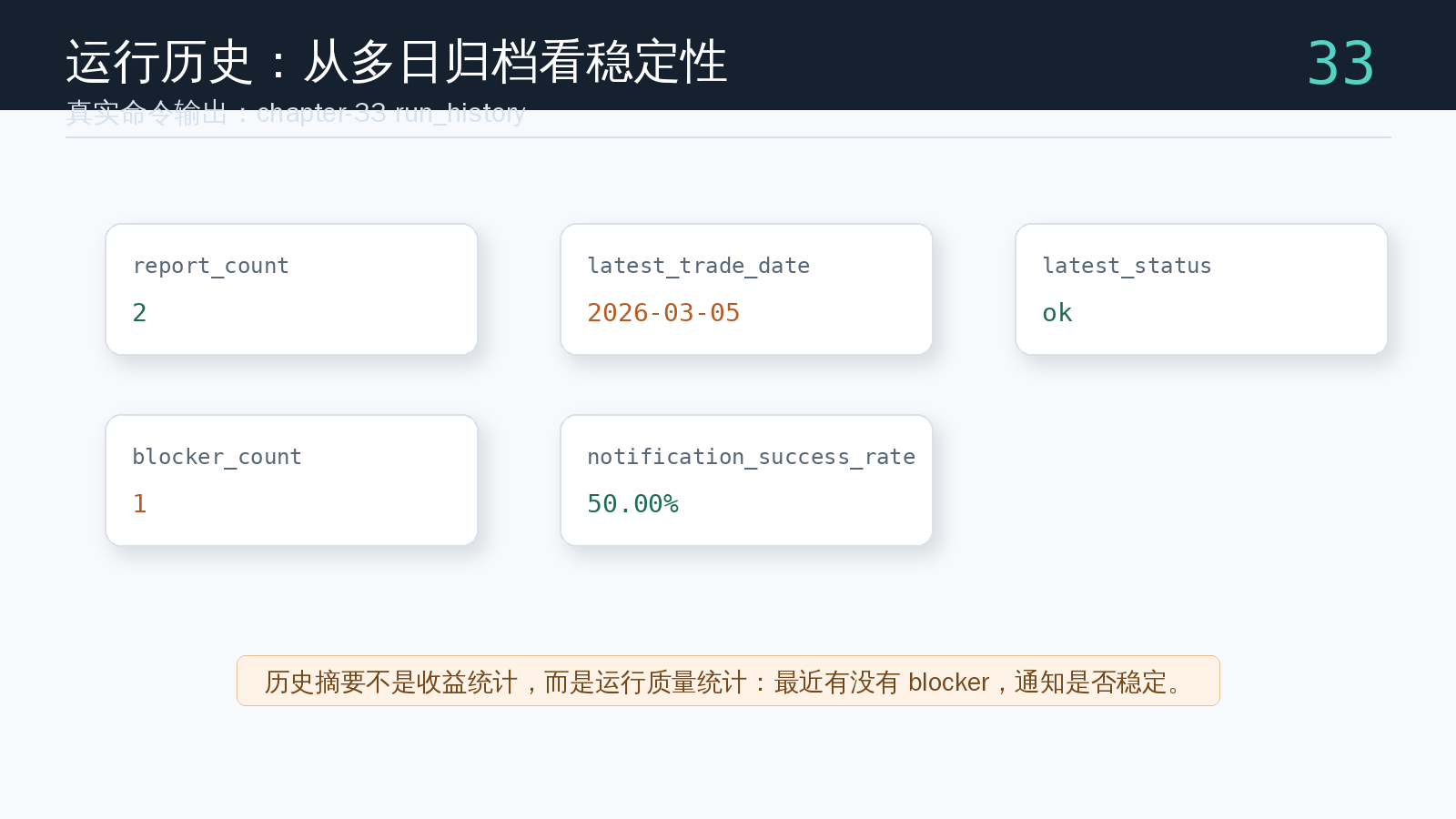
In this run, report_count=2, blocker_count=1, and the notification success rate is 50%. This is not return analysis. It is run-quality analysis. Once a real scheduler is connected, this kind of summary can quickly answer whether recent problems came from strategy performance or an unstable operating chain.
Test History Statistics
The test reuses the archive function from chapter 32 to create two days of data:
uv run pytest tests/test_run_history.pyKey assertions:
assert summary.report_count == 2
assert summary.latest_trade_date == "2026-01-29"
assert summary.latest_status == "blocker"
assert summary.blocker_count == 1
assert summary.notification_success_rate == 0.5
These assertions show that the history summary works steadily across multiple archive files.
Chapter Update And Repository
This chapter adds:
app/run_history.py.RunHistorySummary.- Historical report reads from the daily archive directory.
- Report count, latest status, blocker count, and notification success-rate statistics.
- An integrated
paper-ops-checkexample showing a two-day run-history summary. - The distinction between run-quality statistics and return statistics.
tests/test_run_history.py, covering both normal directories and empty directories.
Repository:
https://github.com/ax2/zi-quant-platformCode for this chapter:
git clone https://github.com/ax2/zi-quant-platform.git
cd zi-quant-platform
git checkout chapter-33
uv sync --extra dev
uv run pytest tests/test_run_history.py
Chapter 33 is commit 9f55d07, tagged as chapter-33.
Summary
The history summary moves paper trading from “did it run today” to “has it been stable recently.”
Article 33 reads archived reports and returns the latest status, blocker count, and notification success rate. The next article handles a common production issue: market data gaps should be detected explicitly instead of being silently ignored by strategy logic.
Follow ZiCode on WeChat
If this post was useful, you can follow later updates on WeChat as well.

X / Twitter
Follow @ax2_zicode
Faster technical notes, short thoughts, and new-post alerts are posted on X.

More in this column
- Quant Trading for Programmers 37: Generate Daily Run Results
- Quant Trading for Programmers 36: Shape The Daily Run Request
- Quant Trading for Programmers 35: Generate An Operations Checklist
- Quant Trading for Programmers 34: Detect Market Data Gaps
- Quant Trading for Programmers 32: Archive Daily Run Results As JSON
- Quant Trading for Programmers 31: Add A Run Window To Daily Jobs
- Quant Trading for Programmers 30: Generate A Daily Run Health Report
- Quant Trading for Programmers 29: Generate Target Weights From A Candidate List